Apex Legends Beginner's Guide: Legends, Movement, and Squad Play
A thorough beginner's guide to Apex Legends covering legend selection, movement basics, looting strategy, and performance tuning.
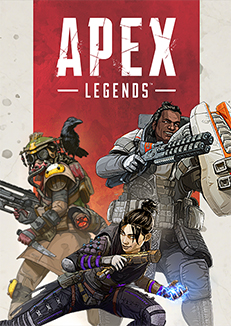
Apex Legends combines battle royale survival with hero-shooter abilities and a movement system that's faster and more mechanically expressive than most other battle royales. That combination makes it exciting, but also intimidating to learn at first. The good news: the fundamentals that matter most (movement, squad communication, armor priority) are learnable before the advanced movement tech.
Choosing Your First Legend
Apex has a large legend roster organized into four classes. As a beginner, ignore class labels for now and focus on ability simplicity:
Lifeline is the best first legend for most new players. Her passive ability (faster revive with a shield drone) is always active and requires no decision-making. Her tactical (D.O.C. healing drone) can be placed and forgotten while you focus on the fight. Her ultimate (care package drop) gives the squad better armor and heals without requiring precise timing. She's forgiving and useful regardless of skill level.
Gibraltar is the second recommendation. His Gun Shield (passive, always on) provides free cover while you ADS, and his Dome Shield ultimate creates an instant safe zone for reviving teammates. He's slower, but survivable in a way that lets you learn gunfights with a longer margin for error.
Wraith is beginner-curious but actually difficult. Her kit is powerful but requires fast decisions (when to phase, how to use portals for rotations). Her hitbox is also one of the smallest in the game, which means she's actually harder to hit when used by an experienced opponent. Hold off on Wraith until you understand the map and combat flow.
The Movement System
Apex's movement is its most distinctive feature, and you don't need to master it early — but understanding the basics prevents you from running into situations other players easily avoid.
Sliding: When you sprint down a slope or off a surface, you can hold crouch to slide. Sliding maintains momentum and makes you a harder target. Make it a reflex: when moving downhill, slide. It costs nothing and is strictly better than walking.
Slide-jumping: At the end of a slide, jump. This briefly extends your momentum and speed. It's the basic version of bunny hopping — you don't need to chain it, just doing the single jump at the end of a slide gets you moving faster across open ground.
Mantling: Apex lets you grab ledges and climb them automatically. Use this constantly. Getting to higher ground in a fight is almost always advantageous, and Apex lets you reach places that look unreachable in other battle royales.
Advanced movement tech (tap-strafing, wall-bouncing) can wait. The above three are accessible to any player from day one.
Looting and Armor Priority
Armor in Apex upgrades in tiers: Common (white, 50 HP), Rare (blue, 75 HP), Epic (purple, 100 HP), and Legendary (gold, 100 HP + perk). Always take higher-tier armor from supply drops or dead enemies — the HP increase is significant.
Evo Armor is the current primary armor system. It starts at a base tier and evolves to higher tiers as you deal damage. Early game, focus on dealing damage to evolve your armor even in fights you're not trying to win decisively.
Loot priority in order:
- Armor — upgrade whenever possible.
- Ammo for your chosen weapons — check ammo type before picking up a gun.
- Shield cells and batteries — armor heals. Carry at least 4 cells and 2 batteries.
- Knockdown shield — when downed, lets you shield incoming shots while waiting for a revive. Never skip this.
- Respawn beacon awareness — your teammate's banner can be picked up after they die (30-second window). You then take it to a Respawn Beacon on the map to bring them back. Learn the beacon locations on your main map.
Squad Communication
Apex's ping system is the best in any battle royale, bar none. You can play effectively without voice chat using pings alone:
- Single ping — "I want to go here" / "enemy spotted here" / "look at this item."
- Double ping — "I'm going here, follow me." Used on your own position.
- Ping an enemy — automatic "enemy spotted" callout with location.
- Ping a looted item — "I already have this, squad can take it."
- Danger ping (hold) — "don't go here / enemy position / stop."
Use pings constantly. Even in squads with voice chat, pinging enemy positions and good loot is faster than saying it. Teams that ping together survive together.
Ring Rotations and Positioning
The ring (Apex's storm equivalent) closes in phases. The ring timer is always visible in the upper right corner of the HUD.
Third-partying is when you engage a squad that's already fighting another squad. In Apex, this is a common and legitimate strategy — you catch both teams weakened. As a beginner, be aware that you will be third-partied constantly. After winning a fight, immediately reposition, heal up, and watch for a third squad rather than looting leisurely.
High ground is valuable but not mandatory. In Apex's more vertical environments, controlling the route to high ground matters more than always occupying it.
Start rotating when the ring timer reaches halfway. Moving with 15 seconds left is stressful and often forces bad fights. Moving with 90 seconds left lets you pick your position, heal, and set up.
Weapons — What to Run as a Beginner
Don't chase exotic care package weapons early on. These two guns carry beginners effectively:
R-301 Carbine (Light Ammo): The most reliable assault rifle in the game. Low recoil, fast reload, forgiving spray pattern. If you find one, use it until you have a strong reason to swap. It works at close, medium, and moderate long range.
Mastiff Shotgun (Shotgun Ammo): Extremely powerful at close range with a predictable spread. Pairs with the R-301 to cover situations where you need to win a close-quarter exchange fast.
Other good beginner options: the Wingman (Sniper Ammo, high damage pistol), Flatline (Heavy Ammo, easy spray), and Devotion LMG (Energy Ammo, slow spin-up but devastating sustained fire).
Avoid the Mozambique (weak without Hammerpoint hop-up), P2020, and RE-45 early in matches — they're openers, not closers.
Common Beginner Mistakes
Thirsting downed players. When you knock an opponent, they're downed but not out. Their squad can revive them. "Thirsting" means finishing a downed player immediately. Beginners thirst before securing the situation — the remaining enemies shoot them in the back while they're focused on the downed player. Assess first: are the other enemies a threat? If yes, deal with them. If you're safe, then finish the downed player.
Splitting from squad. Apex heavily punishes solo play. A 3v1 fight is nearly unwinnable at any skill level. If your squad is rotating together and you're looting alone two zones away, you're setting up a situation where your death is inevitable. Move together.
Ignoring ammo counts. Running out of ammo in a fight is one of the most preventable and most common beginner deaths. Check your ammo count after every fight. If you're under 60 rounds for your main weapon, prioritize refilling before the next engagement.
Performance Settings
Apex Legends benefits from high, consistent frame rates given the speed of its movement and fights:
- FOV: Set to 100 or higher. Higher FOV lets you see more of your environment laterally, which is critical for tracking fast-moving targets.
- Sprint View Shake: Off. This removes the screen wobble while sprinting, making it much easier to track enemies while moving.
- Motion Blur: Off. No exceptions.
- Texture Streaming Budget: Set based on your VRAM. If you have 6GB+ VRAM, set to "High."
- Ambient Occlusion Quality: Low or Disabled. Expensive for minimal gameplay impact.
- Sun Shadow Coverage/Detail: Low. Shadow settings are consistently the best FPS-per-visual-quality tradeoff.
Target 60 FPS minimum; 144+ if your hardware supports it, since the movement system genuinely benefits from higher frame rates. See our how to increase FPS on Windows guide if you're underperforming.
Marcus Webb
Hands-on PC builder and gaming hardware writer at GameInfoZone. Focused on practical, no-hype advice for everyday gamers.
Need Help With Your Gaming Setup?
From custom builds to fixing low FPS and lag, our techs can help you get the most out of your gaming PC.
Request Gaming PC HelpGet Gaming Deals & Setup Tips
Join the GameInfoZone newsletter for gaming gear deals, PC build tips, and performance guides.
Related Articles

Valorant Beginner's Guide: Agents, Roles, and Core Strategy
A thorough beginner's guide to Valorant covering agent roles, economy basics, ability usage, and performance tuning.
Stardew Valley Beginner's Guide: Farm Layout, Early Priorities, and Time Management
A thorough beginner's guide to Stardew Valley covering farm layout choices, early-game priorities, time management, and core systems.

Rocket League Beginner's Guide: Car Control, Positioning, and Boost Management
A thorough beginner's guide to Rocket League covering car control basics, positioning, boost management, and performance tuning.