GTA Online Beginner's Guide: Making Money and Getting Started
A thorough beginner's guide to GTA Online covering early money-making, mission types, properties, and performance tuning.
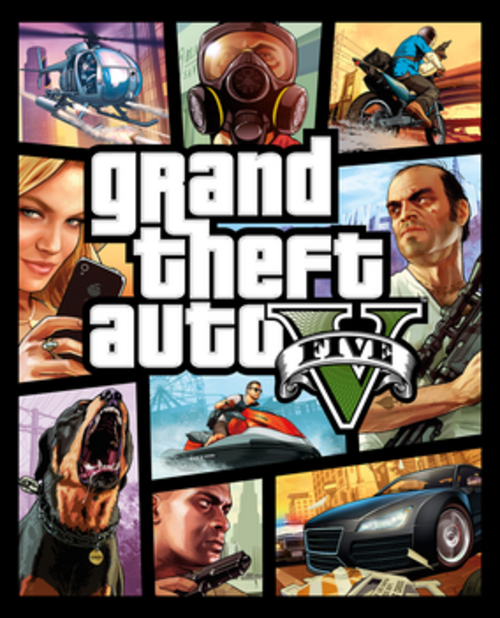
GTA Online is one of the most complex multiplayer games in existence, layered with businesses, heists, vehicles, properties, and a sprawling open world. It's also one of the most confusing games for new players — the game barely explains what to do or why, and making the wrong early decisions can set you back hours of grinding. This guide cuts straight to what actually matters in your first week.
GTA Online vs Story Mode
GTA Online is a completely separate experience from GTA V's single-player story mode. You don't need to complete story mode to access Online, though playing the first few story missions teaches you the basic controls.
GTA Online requires a Rockstar Social Club account and an internet connection. You'll create a new character (separate from the story mode protagonists) and start fresh. Your story mode progress, money, and weapons don't carry over.
The online world is persistent: your character, properties, vehicles, and business income continue between sessions. This is what makes the economy matter — decisions you make on day one affect your position for months of play.
Your First Hour — What To Do First
When you first arrive in GTA Online, you'll be walked through a brief tutorial sequence. Complete it — it introduces the basic mechanics and gives you access to Simeon Yetarian's contact missions, which are your first money source.
Rockstar's new player bonus: Check the Rockstar Newswire (newswire.rockstargames.com) for current new player bonuses. Rockstar frequently offers new players $500,000–$1,000,000 GTA$ for completing certain starter activities. Claim this if available.
Complete the Gerald contact missions (accessible from your phone, contact list). They pay $15,000–$20,000 each in 10–15 minutes and teach you combat and mission structure. Grind these until you hit $200,000.
Start a solo or invite-only session for your first few hours. Go to the pause menu > Online > Options > Find New Session, then select Invite Only. In an invite-only session, other players can't randomly kill you, but all businesses and most missions still function normally. New players who grind in public sessions get repeatedly killed by high-level players with heavily armored vehicles, which is unfun and wastes time.
Making Money as a New Player
The best money-making path in order for new players:
Step 1: VIP Work (~$30,000–$50,000/hr, zero upfront cost) Once your bank account hits $50,000, open the interaction menu (hold the interaction menu button) and register as a VIP. This unlocks VIP Work missions: Headhunter, Sightseer, and Executive Search are the most efficient. Headhunter in particular takes 5–10 minutes and pays $20,000+. VIP status resets every in-game day (48 real minutes), so you can alternate between these.
Step 2: Contact Missions (steady supplemental income) Simeon, Gerald, Martin Madrazo, and Lester all have contact missions accessible from your phone. These are reliable and low-risk. Martin's missions pay well for the time investment.
Step 3: CEO/VIP Office ($1,080,000 upfront) The Maze Bank West office is the cheapest at $1 million. Once purchased, you become a CEO and can start SecuroServ: Steal and sell crates of cargo for profit. The return on investment takes time but unlocks significantly better income than contact missions. This is your medium-term goal.
Step 4: Nightclub ($1,440,000 minimum) The Nightclub is the best passive income property in GTA Online. Once set up with business links (Bunker, MC businesses, Coke/Meth labs), it passively generates product in the background while you do other things. A fully upgraded Nightclub can generate $500,000+ per in-game cycle with minimal active time. This is your long-term income backbone.
What to avoid: Buying the Oppressor Mk II (flying motorcycle, ~$8 million) or other expensive vehicles before you have passive income businesses set up. Many new players grind for weeks to buy flashy vehicles and then have nothing generating income while they're offline.
Staying Safe From Griefers
Passive Mode: Activate from the interaction menu. While in Passive Mode, other players can't harm you with weapons. You also can't harm them. Good for moving around the map without getting randomly killed. Limitation: You can't access most of your businesses or vehicles in Passive Mode.
Invite Only Sessions: As covered above, the safest environment to grind and manage businesses. Other players in your session are only people you specifically invite.
Solo Public Session trick: This method lets you access all business sales and daily objectives while being the only player in a public session (meaning NPC missions scale for you alone, but you can access all Online-exclusive activities). The method changes with patches, but searching "solo public session GTA Online 2026" will find the current working approach. It typically involves using your phone's mobile hotspot briefly to trigger a session transition.
High-level player aggression: If someone is targeting you with an orbital strike or Oppressor, don't fight back with regular weapons — you'll lose. Instead, go inside a building, enter a mission, or use the "Bad Sport" invite option to leave the session.
Essential Vehicles and Properties
First vehicle purchase: The Karin Sultan RS (~$1,700,000 fully upgraded) is excellent as an early general vehicle. Alternatively, the Vapid Dominator or the free vehicles from completing certain missions are fine to start. Don't buy anything before you can afford the vehicle you actually want.
Terrorbyte (~$1,375,000 + Nightclub): This armored truck unlocks Paige's client jobs, which are reliable mid-tier missions. It also lets you upgrade the Oppressor Mk II on the go once you have one. It requires owning a Nightclub as a prerequisite.
Buzzard Attack Helicopter (~$1,750,000): The Buzzard is one of the most practical vehicles in GTA Online for experienced players. Fast, armed, and can pick up players. If your goal is getting around the map and doing missions efficiently, the Buzzard is a better early investment than the Oppressor.
Properties to buy first: CEO Office > Nightclub > Bunker > Arcade (required for the Cayo Perico heist). Don't scatter money across multiple MC businesses early — the Nightclub consolidates all of them more efficiently once you have it.
Business Guide for Beginners
CEO/VIP (Office): The entry point to import/export and crate selling. Start here. Crate selling (fill a warehouse with stolen goods, sell when full) is manual but reliable income.
MC President (Motorcycle Club): You need an MC Clubhouse ($200,000 minimum) to register. MC businesses (Cocaine Lab, Methamphetamine Lab, Counterfeit Cash, Weed Farm) generate passive product. They're less efficient than the Nightclub method unless you constantly manage supply. Skip until you have the Nightclub, then link them to it.
Nightclub: Links to up to 5 other businesses (Bunker, MC businesses) and generates their product automatically in the background. This is the key insight: you don't need to manage Cocaine and Meth separately if you have a Nightclub linked to them. The Nightclub consolidates everything. With full business links and full popularity, it's one of the best passive income sources in the game.
Cayo Perico Heist (Submarine, $2,200,000): The best solo money-making activity in GTA Online. Pays $1.1–$1.7 million per completion with a ~2 hour cooldown. Once you can afford the Kosatka submarine, doing Cayo Perico repeatedly is the fastest way to fund everything else. This is a medium-term goal.
Common Beginner Mistakes
Buying vehicles before businesses. A $4 million car gives you nothing back. A $1 million CEO office starts making you money immediately. Invest in income infrastructure before aesthetics.
Grinding in public lobbies. High-level players with orbital cannons, Oppressors, and explosive rounds will end your grinding session repeatedly. Use invite-only or solo public sessions until you can afford defensive countermeasures.
Ignoring contact missions. New players often ignore the phone contact missions in favor of free roam and wonder why they're broke. Simeon, Gerald, and Martin missions are fast, reliable, and available from day one.
Accepting every invitation from strangers. Random invitations to jobs in public sessions sometimes pull you into difficult missions with no context. Join jobs from the pause menu yourself (Online > Jobs) to filter by type and difficulty.
Free Rockstar Rewards and Weekly Events
Rockstar posts weekly updates every Thursday that rotate bonuses: double money on specific mission types, discounts on properties and vehicles, free cars for completing certain activities. These bonuses regularly double or triple the income from specific activities.
Check newswire.rockstargames.com every Thursday for the current week's events. If a business you're working on (say, the Bunker or Nightclub sells) has 2x money active, that's the week to grind it hard. Timing your major sells around these events significantly accelerates your progress.
For PC-specific performance tuning to get GTA V running smoothly, see our how to increase FPS on Windows guide. GTA V's graphics settings have a large range and can be tuned significantly for better performance without major visual impact.
Priya Anand
Hands-on PC builder and gaming hardware writer at GameInfoZone. Focused on practical, no-hype advice for everyday gamers.
Need Help With Your Gaming Setup?
From custom builds to fixing low FPS and lag, our techs can help you get the most out of your gaming PC.
Request Gaming PC HelpGet Gaming Deals & Setup Tips
Join the GameInfoZone newsletter for gaming gear deals, PC build tips, and performance guides.
Related Articles

Valorant Beginner's Guide: Agents, Roles, and Core Strategy
A thorough beginner's guide to Valorant covering agent roles, economy basics, ability usage, and performance tuning.
Stardew Valley Beginner's Guide: Farm Layout, Early Priorities, and Time Management
A thorough beginner's guide to Stardew Valley covering farm layout choices, early-game priorities, time management, and core systems.

Rocket League Beginner's Guide: Car Control, Positioning, and Boost Management
A thorough beginner's guide to Rocket League covering car control basics, positioning, boost management, and performance tuning.