Overwatch 2 Beginner's Guide: Roles, Heroes, and Team Strategy
A thorough beginner's guide to Overwatch 2 covering role types, hero selection, positioning basics, and performance tuning.
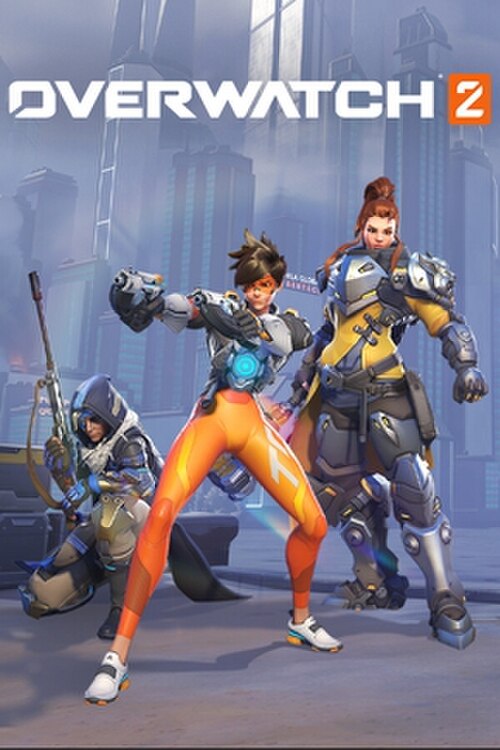
Overwatch 2 is a team-based hero shooter where individual mechanical skill matters less in isolation than understanding your role and working with your team's composition. That team-first structure is a big adjustment for players coming from solo-focused shooters — and it's the first thing that trips up most beginners.
How OW2 Changed from Overwatch 1
The shift from Overwatch 1 to OW2 wasn't cosmetic. The biggest mechanical change is the move from 6v6 to 5v5 matchmaking, which eliminated one Tank slot per team. That single change fundamentally altered how the game feels. In OW1, tanks could hide behind each other and let shields do the work. In OW2, your single tank is fully exposed and expected to actually create space and make plays.
Tanks in OW2 received major reworks to compensate: higher health pools, shorter cooldowns, and more aggressive kits. Roadhog, for example, can sustain himself better. Reinhardt has more active abilities. Orisa was rebuilt almost from scratch. If you played OW1 and feel like tanks behave differently, they genuinely do — they're more powerful individually but require more active decision-making.
The 5v5 format also means supports carry more of the healing burden without a second tank absorbing shots. Playing support is harder than it looks.
Choosing a Role as a Beginner
Picking the right starting role makes the game dramatically less frustrating:
Support is the highest-impact, lowest-aim-floor role for beginners. Mercy requires almost no mechanical aim — her beam locks on with a button press, and her resurrect ability can single-handedly swing a fight. Moira has a healing orb that bounces around on its own and a damage spray that doesn't need precise aim. Both are genuinely effective at low levels without requiring shooter experience.
Tank is more forgiving than DPS mechanically, but now requires real game sense. You're the only tank, so if you hide or die early, your team crumbles. Reinhardt is the most beginner-friendly: stand in front, hold right-click shield, press Q (Earthshatter) when enemies are grouped. Simple concept, high value.
DPS is the hardest starting role. Most DPS heroes require either precise aim (Soldier: 76, Cassidy, Ashe) or complex ability combos (Genji, Tracer, Echo). Don't start here unless you already have strong aim from other shooters.
Beginner-Friendly Heroes by Role
Start with one hero per role and get genuinely comfortable before expanding:
DPS — Soldier: 76 is the best starting DPS hero in the game. His Tactical Visor ultimate literally aims for you. His primary fire is a standard rifle with a self-correcting spread. He has a sprint, a self-heal, and a rocket launcher for burst damage. Every skill you learn on Soldier transfers to the rest of the roster.
Support — Moira is nearly impossible to miss with. Her primary healing is a beam, her orbs bounce and heal on their own, and her Coalescence ultimate makes her nearly immortal while dealing damage. She punishes enemies who ignore her and rewards staying alive over making big plays.
Tank — Reinhardt has the clearest job description of any hero: hold shield, find angles, hit people with your hammer, use Earthshatter when enemies are grouped. His 1,600-health shield absorbs enormous amounts of damage. Once you understand when to put the shield up and when to drop it and swing, you have the core of Reinhardt figured out.
Understanding Hero Counters
Counter-swapping is baked into OW2's design. You're expected to switch heroes mid-match when the matchup is unfavorable, and refusing to is one of the most common ways teams lose winnable games.
Key counters to learn early:
- Reaper counters tanks hard. His shotguns deal bonus damage to high-health targets, and his Life Steal means tanks can't outlast him in close range. If the enemy Reaper is feeding on your tank, your team needs to zone him out.
- Tracer counters Supports. She's designed to flanks backlines and burst squishy heroes. If a Tracer is hunting your healers, your DPS needs to deal with her or your supports need to play closer to the tank.
- Pharah counters heroes who can't aim vertically. Any ground-based hitscan (Soldier, Cassidy, Reaper) has a hard time while Pharah floats above. She loses hard to Soldier, Widow, and Ashe. If you're playing a hero who can't hit her, swap.
You don't need to memorize all 30+ heroes' counters from day one. Learn the 5 most-played heroes in your bracket and their weaknesses. That's enough to make swap decisions.
Game Modes Explained
OW2 has four core game mode types and each has a different strategy:
Control (two-point, 3 rounds): Fight over a single point that both teams contest. The team that holds the point longest wins. Defensive formations and dive compositions both work here; the key is that whoever wins the first teamfight usually gets the point.
Escort (payload): Attackers push a payload to the endpoint; defenders try to stop it. As attacker, stay on or near the payload to move it. As defender, the payload stops the moment no attackers are close. Fights happen on and around the payload, not off to the side.
Hybrid (capture then escort): Attackers capture a point first, then escort a payload. The two phases play differently — capture is chaotic, escort is slower.
Push (robot): Both teams fight over a single robot that walks toward the enemy base when your team stands near it. Whoever pushes the robot furthest when time expires wins. The midgame ping-pong of control is unique to this mode.
Positioning and Cover
The number-one reason DPS players die in one second is overextending. You walked past your tank, past your supports, and into a 1v3. No hero can survive that.
The basic mental model: stay within line of sight of your support. If your healer can't see you, you can't get healed. If you take damage and can't get healed, you die in seconds. DPS heroes feel squishy because they are — they're designed to deal damage from safe angles, not absorb damage like a tank.
Peek-and-retreat rhythm: step out to shoot, step back into cover to reload or receive heals, then step out again. This is basic but most new players stand in the open and try to out-aim the enemy. You'll lose that trade until your aim improves.
High ground is free value. Any hero on high ground has better angles, harder-to-hit positioning, and easier retreat paths. Before a fight starts, ask where the high ground is and whether your hero can reach it.
Ultimate Economy
Ultimates decide most fights in Overwatch 2. Having one when the enemy doesn't is a massive advantage; blowing yours into a defensive ultimate is often wasted.
Two rules:
-
Don't use your ultimate when the enemy has an obvious counter ready. Using Earthshatter when the enemy Lucio is about to press Q (Sound Barrier blocks its stun) is a complete waste. Use ult when you have information that counters aren't imminent.
-
Ultimate trading is intentional. Sometimes the right play is to use your ult to bait out theirs, then let a teammate finish the fight. Supports especially should hold ultimates defensively — Mercy's Valkyrie or Lucio's Sound Barrier as a response to enemy offensive ults often wins fights that look unwinnable.
Build your ult faster by staying alive and dealing/healing consistently. Players who die and respawn repeatedly build ult charge slower. Survival equals ult generation.
Common Beginner Mistakes
Supports only healing: Moira's damage orb should be out constantly. Ana's grenade deals damage and amplifies all healing on the target. Lucio's amp-it-up heals 60+ HP/sec to the whole team. Supports who only react to health bars instead of proactively playing around the team lose much more than those who do both.
Tanks hiding behind shield all game: In OW2's 5v5, the tank's job is to create space, not just absorb shots. If you're Reinhardt and you've been holding shield for 30 seconds straight, you're not generating pressure. Drop the shield, swing, get back into position.
Ignoring the objective entirely: In Escort, players frequently fight 20 meters from the payload accomplishing nothing. Every second spent fighting away from the cart is a second of progress being halted. Fight on the payload, not near it.
Never swapping heroes: If you've died to the same Pharah four times, the answer is to swap to Soldier or Ashe, not to try harder with your current hero.
Performance Settings for OW2
OW2 target FPS should be at least 60, ideally 144+ if your monitor supports it. Key settings to adjust first:
- Render Scale: Drop from 100% to 75% for a significant FPS boost with minimal visual difference at 1080p.
- Dynamic Render Scale: Enable this and let the game automatically adjust resolution to maintain your target FPS.
- Shadows: Set to Low or Medium. High shadow quality is one of the biggest FPS costs in team fights.
- Anti-Aliasing: FXAA or off is better for performance than TAA on lower-end hardware.
See how to increase FPS on Windows for system-level tuning outside the game, and best router settings for gaming for reducing ping in ability-heavy team fights where timing is everything.
Frequently Asked Questions
Which role should a complete beginner start with? Support. Mercy and Moira can both be played effectively without strong mechanical aim, and supports have an enormous impact on every match outcome without needing to carry individually.
Do I need to memorize every hero before playing? No. Pick Soldier: 76 (DPS), Moira (Support), and Reinhardt (Tank). Get comfortable with each, then expand to a few counters to common picks you struggle against. That's a complete starter toolkit.
Is crossplay between console and PC in OW2? Yes, but input-based matchmaking keeps controller players and mouse/keyboard players largely separate in competitive modes. PC players use M&K by default; console players use controller.
If you enjoy team-based hero shooters, see our Valorant beginner's guide for a comparison with the other major team tactical shooter.
Marcus Webb
Hands-on PC builder and gaming hardware writer at GameInfoZone. Focused on practical, no-hype advice for everyday gamers.
Need Help With Your Gaming Setup?
From custom builds to fixing low FPS and lag, our techs can help you get the most out of your gaming PC.
Request Gaming PC HelpGet Gaming Deals & Setup Tips
Join the GameInfoZone newsletter for gaming gear deals, PC build tips, and performance guides.
Related Articles
Valorant Beginner's Guide: Agents, Roles, and Core Strategy
A thorough beginner's guide to Valorant covering agent roles, economy basics, ability usage, and performance tuning.
Stardew Valley Beginner's Guide: Farm Layout, Early Priorities, and Time Management
A thorough beginner's guide to Stardew Valley covering farm layout choices, early-game priorities, time management, and core systems.

Rocket League Beginner's Guide: Car Control, Positioning, and Boost Management
A thorough beginner's guide to Rocket League covering car control basics, positioning, boost management, and performance tuning.